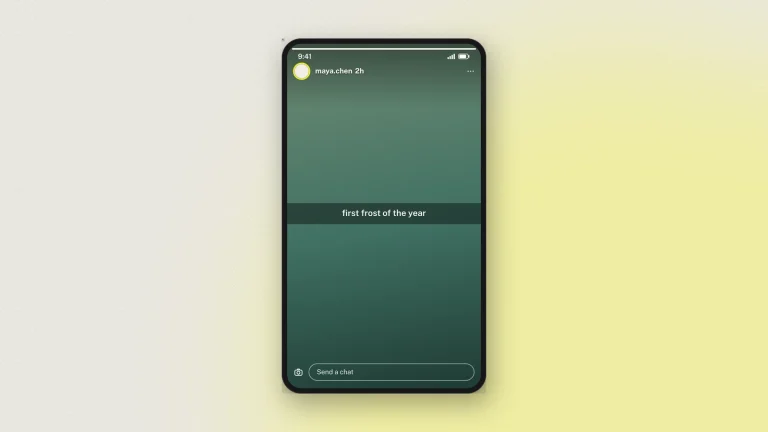
What is a fake Snapchat post generator?
A fake Snapchat post generator draws a snap — a full-screen photo with Snapchat's own header, caption bar and action row — as a downloadable image. You upload the picture, write the caption, and set the name and time. The output is an image of a snap; nothing is sent to Snapchat and no account is connected.
A snap is the most temporary thing on social media, which makes a Snapchat simulator the only way to keep one. Teachers and youth workers use one to discuss what gets sent on a platform built around disappearing — the conversation is easier with a made-up snap on the screen than a real one. Designers use one to show a campaign in the format, at the right proportions, before anything is shot.
Features of the fake Snapchat post generator
- Full-screen 9:16 snap with Snapchat's header, action row and timer.
- Caption bar you can move up and down the frame, as the app allows.
- Your own photo behind it, cropped to the frame and kept in your browser.
- Name, time and avatar, all editable.
- Several layouts, from an everyday snap to an event, a story post or a scam example.
- HD download at the platform's own 9:16 size.
How to make a fake snap
The fake Snapchat post generator and simulator builds a Snap mockup — a full-screen snap with its overlay — in your browser. No install, no account.
- Upload the picture. A snap is a photo filling the screen, in Snapchat's 9:16 shape. Yours is resized in the browser to fit it.
- Add the caption bar. The black translucent strip across the middle with white centred text, which is the single most recognisable thing about a snap.
- Set the sender. Name and avatar in the header, with a time since the snap was sent.
- Add the overlay. Timestamp sticker, location, temperature and the other furniture Snapchat lays over a photo.
- Download. Tick the responsible-use box, choose 2×, 3× or 4×, and take a PNG or a PDF.
Everything is edited on the preview: the dashed areas are editable and tapping one opens its field.
How to use the fake Snapchat post generator for schools
Snapchat is built around things disappearing, which makes it the hardest platform to discuss with evidence and the most useful one to be able to stage.
- Nothing really disappears. Show a snap, then point out that a screenshot was always possible. That is the entire lesson.
- Pressure and consent. Discuss what gets sent on a platform that promises it will vanish, using an image nobody actually sent.
- Scam and impersonation. Build the fake-giveaway snap and work through what gives it away.
- Online classes. Export at 9:16 and the frame fills a phone exactly, which is where the conversation lives.
Label it as a mockup wherever it goes beyond the room.
Snap design tips
What makes a snap simulator output look like a snap.
- The caption bar is centred and short. One line, occasionally two. A paragraph in the caption bar is not something anyone has sent.
- Keep the photo casual. Snaps are not composed. A stock photograph with professional lighting reads as an advert, not a snap.
- Vertical only. A snap is 9:16. A landscape photo letterboxed into the frame is the fastest way to lose the illusion.
- Don't crowd the overlay. One or two stickers. Snapchat's own interface is busy enough that a third competes with it.
- Mind the safe area. Keep the caption away from the very top and bottom, where the header and the reply bar sit.
- Export at 3× or 4×. Full-screen images show compression first, and a snap is all image.
Every image carries a hidden origin mark the verification tool reads back from the original file. Resizing a snap or re-saving it as a JPEG destroys that mark.
Snapchat Post examples
What people build with this Snapchat post simulator.
- Online-safety teaching. Snapchat's disappearing content is exactly what makes it hard to show in a lesson, and a recreated snap solves that without any real one being shared.
- Consent and sharing lessons. What a screenshotted snap looks like, and why that matters, shown rather than described.
- Marketing and campaign pitches. A proposed snap in context before anything is published.
- App and product design. A placeholder snap inside a mockup, at a resolution that survives a projector.
- Fiction and film. On-screen content for a production.
- Parody and pranks. A prank on a friend is fine when it is obviously a joke. Label it, and nobody is left believing it.
For a conversation rather than a snap, use the Snapchat chat generator.
FAQ
Is the fake Snapchat post generator free?
Yes, with no sign-up. Every feature, including HD downloads, works as a guest.
Can I use my own photo?
Yes. It is resized in your browser to the 9:16 snap shape; your original file is not what reaches us.
Can I add the caption bar?
Yes — the translucent strip with centred white text that Snapchat lays across the middle.
What size is the export?
9:16 at 2×, 3× or 4×, as PNG or PDF. 4× is sharp enough for print and large screens.
Does it add a visible watermark?
No. The "Not an original screenshot" line is on chat mockups, which are the ones most easily mistaken for real screenshots. Every image still carries the hidden origin mark, read back from the original file.
Is my snap uploaded anywhere?
You edit it in your browser and nothing is sent while you work. Downloading sends the finished image to us once, to be signed, and we keep a record of it. Nothing is ever sent to Snapchat. See the privacy policy.
Can I publish these images?
For teaching, training, design and clearly-labelled parody, yes. Never to deceive or impersonate — see responsible use.
Disclaimer
Snaps made here were never sent. Snapchat content is built to disappear, so nobody can check a snap mockup against an original — label it wherever it goes. Zeoob is an independent education tool, not affiliated with or endorsed by any platform it imitates. Use the images for teaching, training, design, documentation and clearly labelled parody — never to deceive or impersonate. Every download carries a hidden origin mark that the verification tool reads back, and responsible use sets out where the line sits.