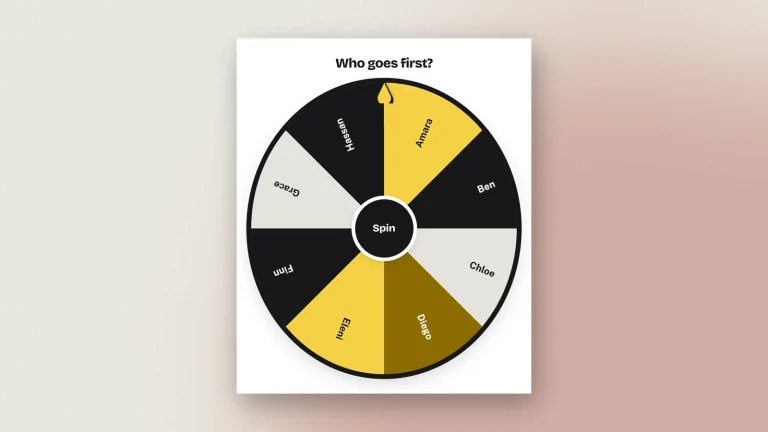
- Amara
- Ben
- Chloe
- Diego
- Eleni
- Finn
- Grace
- Hassan
Winner
Nothing saved yet. Your work is kept in this browser as you go.
X / Twitter
TikTok
More tools
Paste a list, spin the wheel, and let it choose. Free random name picker for classrooms, giveaways, teams and decisions — no sign-up, and it works on a phone.
Winner
The Wheel of Names is an online tool designed to randomly pick names from a customizable wheel. Users can enter multiple names, customize the wheel’s appearance, and spin to find a winner.
Have you ever struggled to make a decision or randomly select someone for a game or giveaway? The Wheel of Names is here to help! This engaging tool allows you to input names and spin a colorful wheel to make your selection in a fun, interactive way. Whether you’re organizing a classroom activity, hosting a party, or simply need to make a choice, Wheel of Names makes it easy and exciting.
To get started, simply enter the names or options you wish to include, customize the wheel to your liking, and click on the “Spin” button. Watch as the wheel spins and randomly selects one of your entries, making it perfect for parties, classrooms, and team-building exercises.
This tool is particularly useful for educators looking to engage students in a fun way. By using the Wheel of Names, teachers can randomly select students for participation, quizzes, or rewards. Try it today and bring excitement to your selections!
A wheel of names is a random name picker: you type a list, spin the wheel, and it lands on one entry. It is the physical gesture of drawing a name out of a hat, done on a screen where a whole class or a whole meeting can watch it happen. The spin is genuinely random, and the wheel can be set to remove a name once it has been picked so nobody comes up twice.
The reason to spin a wheel rather than just choose is that everyone sees it is fair. Teachers use one to pick who reads next or who answers, which takes the decision off the teacher and the sting out of being chosen. Teams use one for standup order, for who presents, and for prize draws. It works on the board at the front of a room as well as on a laptop.
The wheel runs in your browser. No account, nothing installed, and nothing is sent anywhere while you use it.
Two switches change how a spin behaves. Hide names until it stops spins a blank wheel, so nobody can follow their own name round. Remove the winner takes each name off as it comes up, which is how you work through a whole class without anyone being picked twice.
The reason to spin rather than simply choose is that everyone watching can see it was fair.
The list never leaves the browser, so a class register typed into it is not sent anywhere.
A wheel is only useful if the room trusts it. These are the things that decide whether it does.
What people spin it for.
It is a different kind of tool from the rest of Zeoob — everything else here draws a picture of a social media post. If that is what you were after, the Instagram post generator and the fake tweet generator are the two most used.
Yes, with no sign-up. Every feature, including HD downloads, works as a guest.
The landing position comes from your browser's random number generator, and the winner is read off wherever the wheel stops rather than chosen in advance. Nothing is weighted, and no name is more likely than any other. Shuffle uses a Fisher–Yates shuffle, so every ordering is equally likely — the one-line sort trick most sites use for this is measurably biased.
Up to 4,000 characters, which is several hundred names. Two to twenty is where the labels stay comfortably readable.
Yes — turn on Remove the winner and each name comes off the wheel as it is drawn.
Yes. The wheel spins blank and the names reappear when it stops.
Yes. The editor has a phone layout with the wheel above and the controls below, and you can tap the hub to spin.
Auto-save keeps your wheel in that browser. Log in and it follows you between devices.
Not while you use it. Downloading sends the finished picture to us once so it can be signed, and we keep a record of it — see the privacy policy. The names themselves are never sent anywhere unless you download.
No visible one. A wheel is not a screenshot of anything, so there is nothing for anyone to pass off as real. Every image still carries the hidden origin mark that the verification tool reads from the original file.
The wheel is a random picker and nothing more. It makes no decision for you and keeps no record of who was drawn, so do not present a spin as an audited or supervised draw. Zeoob is an independent education tool, not affiliated with or endorsed by any platform it imitates. Use the images for teaching, training, design, documentation and clearly labelled parody — never to deceive or impersonate. Every download carries a hidden origin mark that the verification tool reads back, and responsible use sets out where the line sits.
Step-by-step guides and ideas for getting more out of this tool.
We use cookies for analytics, for ads and for the anti-bot check on our forms. The generators work either way. Cookie policy