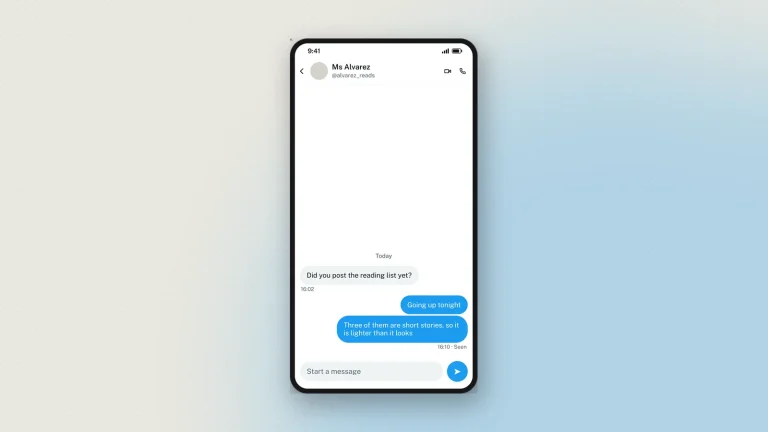
What is a fake Twitter (X) chat generator?
A fake Twitter chat generator builds an X direct message thread — a DM conversation — as a picture. You write both sides, name and avatar each participant, set the verified ticks and the seen receipts, and pick light, dim or dark. The output is an image of a DM screen; no message is sent and no X account is touched.
A direct message mockup is the awkward thing to fake any other way, because a DM is private by definition: you cannot screenshot someone else's inbox to make a teaching example. This is the usual reason people want one — showing a class what a scam DM or an impersonation attempt actually looks like, or documenting a support flow where a real conversation would expose a real person.
Features of the fake Twitter chat generator
- Both sides of the thread. Write every message, and give each participant a name, a handle and an avatar.
- Verified ticks on either party, so an impersonation example reads correctly.
- Seen receipts and timestamps, set per message rather than generated.
- All three themes. Light, dim and dark, as X draws them.
- Photos in the thread, which is how most scam DMs actually arrive.
- HD download. PNG or PDF at 2×, 3× or 4×, and nothing sent while you work.
How to make a fake X (Twitter) DM
The fake Twitter chat (DM) generator builds an X direct message mockup in your browser. No install, no account.
- Set the contact. Display name, @handle, avatar and the verified tick, laid out the way X's DM header lays them out.
- Write both sides. Each message is a card: Them or Me, the text, and the time. Yours are blue and theirs are grey, as X draws them.
- Add photos and date dividers. Both are drawn the way the app draws them.
- Mark messages as seen. X puts "Seen" under the last message of a run rather than against every bubble.
- Pick a theme. Light, dim or dark — the same three X offers everywhere else.
- Download. Tick the responsible-use box, choose 2×, 3× or 4×, and take a PNG or a PDF.
Dashed bubbles on the preview edit in place, and the newest message sits at the bottom as it does in the app.
How to use the fake Twitter chat generator for schools
A DM is private by definition, so there is no honest way to screenshot a real one for a lesson. That is the whole reason to build one.
- Scam and phishing awareness. Show the approach as it actually arrives — a verified-looking account, a short friendly opener, a link.
- Impersonation. Put the tick on the wrong account and ask the class what it proves. It proves someone paid.
- Safeguarding. Discuss a grooming pattern with no real child's messages anywhere on the screen.
- Online classes. Export at 3× so the small type in a DM is still legible on a shared screen.
Keep the originals: every download carries a hidden origin mark the verification tool reads back, so a mockup used in class can always be shown to be one.
Chat design tips
Details that decide whether an X DM mockup reads as a screenshot.
- Handle and name both show. X's DM header carries the display name with the @handle under it. A header with only one of them is wrong.
- Blue is yours, grey is theirs. A thread where both sides are blue is not a thread anyone has seen.
- Seen sits once, at the end. Under the last message of a run, not under each one.
- Use the dim theme for slides. Dark is heavy on a projector, light blows out under a bright lamp, dim sits between them.
- Keep messages short. DMs are shorter than posts. A paragraph in a DM bubble is a tell.
- One phone screen. The preview is a phone, so a long conversation runs off the top.
Every chat download carries a faint "Not an original screenshot" watermark plus a hidden origin mark the verification tool reads from the original file.
X (Twitter) Chat examples
What a Twitter DM mockup is used for. It is a simulator, not a client — nothing you write is sent to anybody.
- Scam awareness. The fake verification offer, the brand-partnership approach, the crypto pitch — the DMs that arrive after any account gets a little attention.
- Online-safety teaching. A pressure or harassment exchange recreated safely, so a class can name the pattern.
- Press and PR training. A worked example of an approach message, used to show tone to a team.
- Marketing and design pitches. A placeholder DM inside an app mockup, at the right resolution.
- Documentation. A screenshot in a help article that will not break when the real conversation is deleted.
- Fiction and film. On-screen messages for a production.
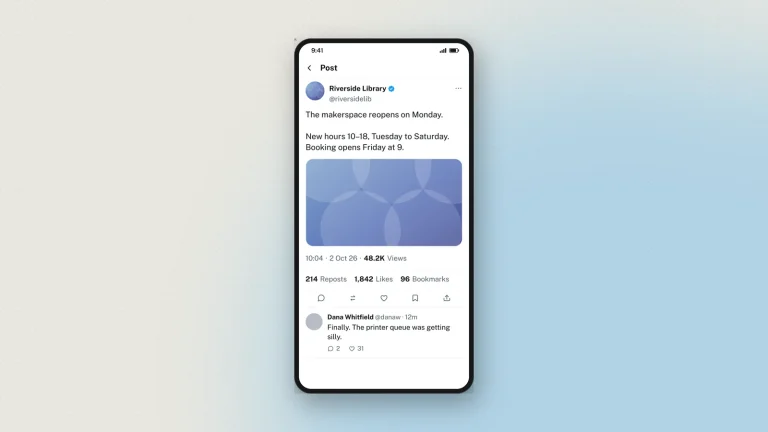
For a public post rather than a private message, use the fake tweet generator.
FAQ
Is the fake Twitter chat generator free?
Yes, with no sign-up. Every feature, including HD downloads, works as a guest.
Is this for X or for Twitter?
Both — it is the same product under two names, and the mockup follows X's current direct message design.
Can I add the verified tick?
Yes, as a switch beside the display name.
How do I mark a message as seen?
Mark the last message in a run; X shows the label there rather than against every bubble.
Does it do dark mode?
All three X themes: light, dim and dark.
Can I add photos?
Yes, along with date dividers between days.
How many messages can a thread have?
Up to 50 items, and every row in the thread counts as one — messages, photos and date dividers each take a slot, not just the text bubbles. The preview is one phone screen and scrolls through the thread, opening on the newest message; the download is the whole conversation, however long it runs.
Is my conversation uploaded anywhere?
You edit it in your browser and nothing is sent while you work. Downloading sends the finished image to us once, to be watermarked and signed, and we keep a record of it. Nothing is ever sent to X. See the privacy policy.
Disclaimer
The direct messages made here were never sent. A DM mockup is especially easy to misuse because nobody else can check a private inbox, so never present one as a record of a real conversation. Zeoob is an independent education tool, not affiliated with or endorsed by any platform it imitates. Use the images for teaching, training, design, documentation and clearly labelled parody — never to deceive or impersonate. Every download carries a hidden origin mark that the verification tool reads back, and responsible use sets out where the line sits.