How to Make Tweets With a Custom Tweet Generator
Set the author, the text, the counts and the theme, add replies and a context note, then download your tweet mockup in HD. Free, no sign-up.

On this page
Making a tweet mockup takes about two minutes once you know which fields matter. Most of them are obvious. Three are not, and they are the ones that decide whether anybody argues with the result.
This walks through the fake tweet generator in the order you would actually use it.
1. Pick a template, or start blank
The strip above the editor offers a handful of starting points. They are worth using: each arrives with text of roughly the right length, counts that sit in a believable ratio, and a reply or two underneath. Those are the three things that take longest to get right from nothing.
Change everything about whichever you pick. A template is a starting shape, not a draft.
2. Set the author
Display name, @handle, avatar, and the verified tick.
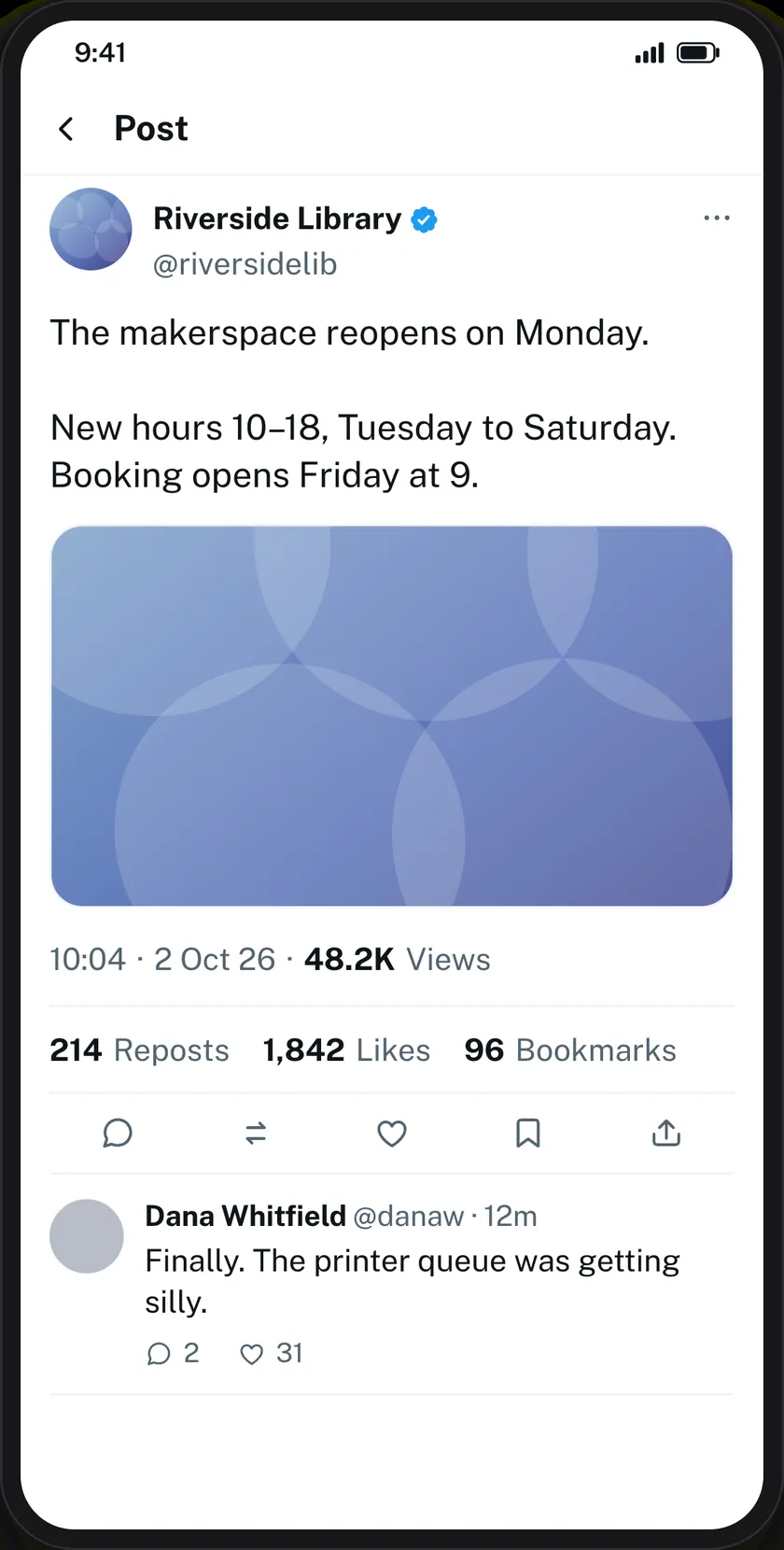
The handle has to match the name. “Riverside Library” with @user12345 is wrong before the post has been read; @riversidelib is right. This is the most common fault in a hand-made tweet mockup and the easiest to fix.
Leave the tick off unless you mean it. Most accounts are not verified, and a badge on an ordinary-looking account invites the question.
3. Write the text
Up to 2,000 characters. X allows 280 on a free account and far more on a paid one, so the tool does not force you into the limit that only applies to half of X’s users.
If the point of your example is the 280-character constraint, stay under it. If the point is a long argument, write the long argument.
4. The counts, and the ladder they follow
Views, reposts, quotes, likes and bookmarks are all free text, so 11 and 11M both work.
They are not independent. On X, views run far ahead of likes, likes ahead of reposts, reposts ahead of quotes. Break the order and someone will spot it — a post with 40 likes and 9,000 reposts is not something anybody has seen, and once a reader notices one wrong number they stop reading the post and start auditing the mockup.
5. Theme
Light, dim and dark, which are the three X itself offers.
Dim is the one for a slide deck. Dark goes heavy under a projector and light blows out in a bright room. This is a dull observation that saves a lot of squinting at the back of a hall.
6. The posted-from line
An optional field under the timestamp: “X for iPhone”, “X for Android”. It is small, it is easy to skip, and it is one of the first things people check when they are arguing about whether a screenshot is genuine. Fill it in.
7. Replies and context
Add up to twenty replies, each with its own name, handle, avatar, tick, time and counts. You can chain them so one answers the one above it rather than the original post.
Let them disagree. A thread where everyone agrees is a poster. One sceptical reply makes the whole mockup useful for a media-literacy lesson instead of just decorative.
There is also a Readers added context box — the community-note panel X puts under posts it has labelled. If your lesson is about how platforms correct misleading claims, that box is the lesson, and nothing else on the page demonstrates it.
8. Edit on the preview
Every dashed area on the preview opens its own field when you tap it. On a phone the editor splits — preview on top, controls below — and follows whichever field you are in. Auto-save keeps your work in the browser as you go.
9. Download
Tick the responsible-use box, choose 2×, 3× or 4×, press Generate. PNG, with a PDF button beside it.
- 2× on screen.
- 3× in a slide deck.
- 4× for anything printed.
Every image carries a hidden origin mark, which the verification tool reads back from the file as it was downloaded — resizing it or re-saving it as a JPEG destroys the mark. What makes this safer than screenshotting somebody’s real post is simpler than the mark, though: there is no real person in it.
If you want the desktop layout
The PC version draws X’s wide web layout instead of the phone one. It fits a 16:9 slide without empty columns either side, and a long post reads as a block rather than a tall column. Everything you can set is the same.
Common questions
Is it free?
Yes, with no sign-up. The verified tick and HD downloads work as a guest.
How long can the text be?
Up to 2,000 characters.
Can I add a picture to the tweet?
Yes.
Can I make a thread?
Yes — up to twenty replies, chained so each can answer the one above.
Does it post anything to X?
No. Nothing is sent to X at any point. Downloading sends the finished image to us once so it can be signed — see the privacy policy.
What about direct messages?
Different format: the Twitter DM generator.
Label what you make as a mockup wherever it goes — see responsible use.
19 comments
-
Startup Archives
One the of best fake tweets generator.
-
Lawrence
Can you tell me what system are you utilizing on this web
site? -
niklasclement
Its the best Fake Tweets Generator
-
موقع امازون بالعربي
Attractive tools collection. I see here the best fake tweets generator! Keep it up guys
-
willapalmer
Wao its the best tweets generator
-
romainemccune
Ԍreetings from Օhio! I’m bored to tears at work so I decided to check out
ʏour blog on my iphօne during lunch break. I enjoy the info you provide here and can’t wait to take a look when I get һome.
I’m amaᴢed at how quick your blog loaded on my phone ..
I’m not even using ԜIFI, just 3G .. Anyways, good blog! -
kandyfidler
It’s actually a great and useful piece of tools.
-
Latashia
Best fake tweet generator, i really loved it.
-
raymundo bromilow
Thanks on your marvelous posting! I certainly enjoyed reading
it, you’re a great author. -
leanneehret
I just generated fake tweet, it looks real, i liked your generator very much.
-
ericafior
Hi there, constantly i used to your fake twitter posts generator here in the early hours in the morning 😀
-
carrozza
Best fake tweets generator, its nice to use
-
jacksonallman
Thank you for this magnificent twitter simulator.
-
KelBibe
One of best fake tweet generator, i ever used. I have a suggestion, make better retweet profile images
-
janicemccann
І useԀ to be recommended these tools collection to my cousin. I am not sure whether this put up is written Ьy means of him
as no one else understand such unique about my trouble.
You are incredible! Thank yоᥙ! -
jeffreylerma
A fascinating tool is definitely worth comment.
-
Analisa kirby
Its far better than simitator.
-
katiachecchi
Nice blog right here! Also your web site quite a bit up very fast!
-
analeon
Its amazing tweet generator, i just loved it.