How to Verify an Image Is Real: A Field Guide to Screenshot and Photo Forensics

On this page
A screenshot is one of the easiest things in the world to fake, and a convincing fake now travels faster than the correction ever will. A tweet that was never posted, a DM that never happened, a receipt that never existed — all of it can be built in a minute, and most people share it on sight. Verifying an image is the skill that sits between “I saw it online” and “I know it’s real.”
This guide is a working method, not a lecture. It starts with a ten-second glance anyone can do, moves through the file-level forensics a researcher relies on, and ends with the documented workflow a fact-checker needs to stand behind a verdict. Use the part that fits the moment.
One rule holds the whole thing together, so read it twice: no single test proves anything. You gather independent signals, you weigh them together, and you state your confidence honestly. The absence of a tell is not proof that an image is real — it only means you have not found the seam yet.

Part 1 — First moves (fast, no tools, anyone)
Most fakes fall apart in the first thirty seconds. Start here before you open a single tool.
1. Look for a visible watermark — first, always
Responsible generators stamp their output on purpose. Zeoob prints a faint “Not an original screenshot” mark on every chat export, and other honest tools add their own — and a good mark is built to survive a crop (Zeoob’s, for one, repeats diagonally across the image, so cropping out a single message still leaves one in frame). If you can see one, you are finished: the image is a mockup. This is the fastest and most definitive check there is, which is exactly why it goes first.
The honest catch: a visible watermark can be cropped off, blurred, or painted out, and not every tool adds one. So a watermark you can see is strong proof the image is fabricated — but a watermark you cannot see proves nothing at all. Note it and move on.
2. Reverse image search
Lift the image into a reverse-search engine and look for where it really came from and when it first appeared. Use more than one, because they index different corners of the web:
- Google Lens / Images — broadest coverage, best for products, memes and widely-shared images.
- TinEye — sorts by oldest first, which is what you want for finding the original.
- Yandex — unusually strong on faces and places, and often finds matches the others miss.
- Bing Visual Search — a useful third opinion.
What you are hunting for: an earlier version, a different caption, or the original context the current post has stripped away. A “breaking news” photo that first appeared three years ago in another country has already answered your question.
3. Read the context, not just the image
Who posted it, when, and what is the account’s history? A day-old account with one viral post is a flag. So is a claim that only ever appears as a screenshot and never as a link to the original. Ask what a tight crop might be hiding just outside the frame.
4. The “does it even match the real app?” glance
If it is a screenshot of a platform, compare it to how that platform actually looks today — fonts, spacing, the status bar, button shapes, the chrome around the content. Apps change their design constantly; a 2026 interface on a post dated 2021 (or the reverse) is a seam worth pulling. We cover these tells in depth in Part 3.
Part 2 — Interrogate the file itself
When the quick pass is inconclusive, the file carries evidence the picture does not show.
5. Metadata (EXIF)
Photos carry EXIF metadata: camera model, lens, exposure, the software that last saved the file, a timestamp, sometimes GPS coordinates. Read it with ExifTool (the reference tool, by Phil Harvey) or any reputable online EXIF viewer.
Two caveats decide how much to trust it. First, most social platforms strip EXIF on upload, so its absence tells you almost nothing — it usually just means the image went through Instagram or X. Second, EXIF is trivially edited, so its presence is a lead, not a verdict. A “Photoshop” tag in the software field is a reason to look harder; a clean-looking timestamp is not a reason to stop.
6. Content Credentials (C2PA)
The emerging answer to “where did this come from” is C2PA / Content Credentials — a tamper-evident provenance record attached to the file, backed by Adobe, camera makers and news agencies. Where EXIF is a sticky note, this is a signed chain of custody. Look for the “CR” marker and check it at contentcredentials.org/verify. It is not yet everywhere, but when it is present it is the single strongest provenance signal available, and it is worth teaching students to look for because it is the direction the whole field is moving.
7. Error Level Analysis and compression
JPEG images lose a little quality every time they are saved. When part of an image has been pasted in or edited and the file re-saved, that region can compress differently from its surroundings. Error Level Analysis (ELA) — on FotoForensics or Forensically (29a.ch) — visualises those differences.
A warning that matters: ELA is the most misread tool in the kit. Edges, high-contrast areas and text naturally light up, and a heavily re-shared image is uniformly degraded so nothing stands out. ELA points you at regions to examine with your own eyes; it does not declare a fake on its own. Treat a bright patch as a question, never an answer.
8. Pixel-level tells
Zoom in and look for the physics breaking down: cloned patches that repeat, spliced edges with faint halos or mismatched sharpness, noise that is smooth in one area and grainy in another, shadows that fall in two directions, reflections that do not match, perspective that cannot hold. Forensically’s clone-detection and noise-analysis views make these easier to spot.
Part 3 — Screenshot forensics
Screenshots are their own discipline, and they are where most everyday fakes live — a chat, a tweet, a post that “proves” something. The good news is that fabricated interfaces almost always get a detail wrong, because the real apps are more finicky than people remember.
9. Interface-accuracy tells
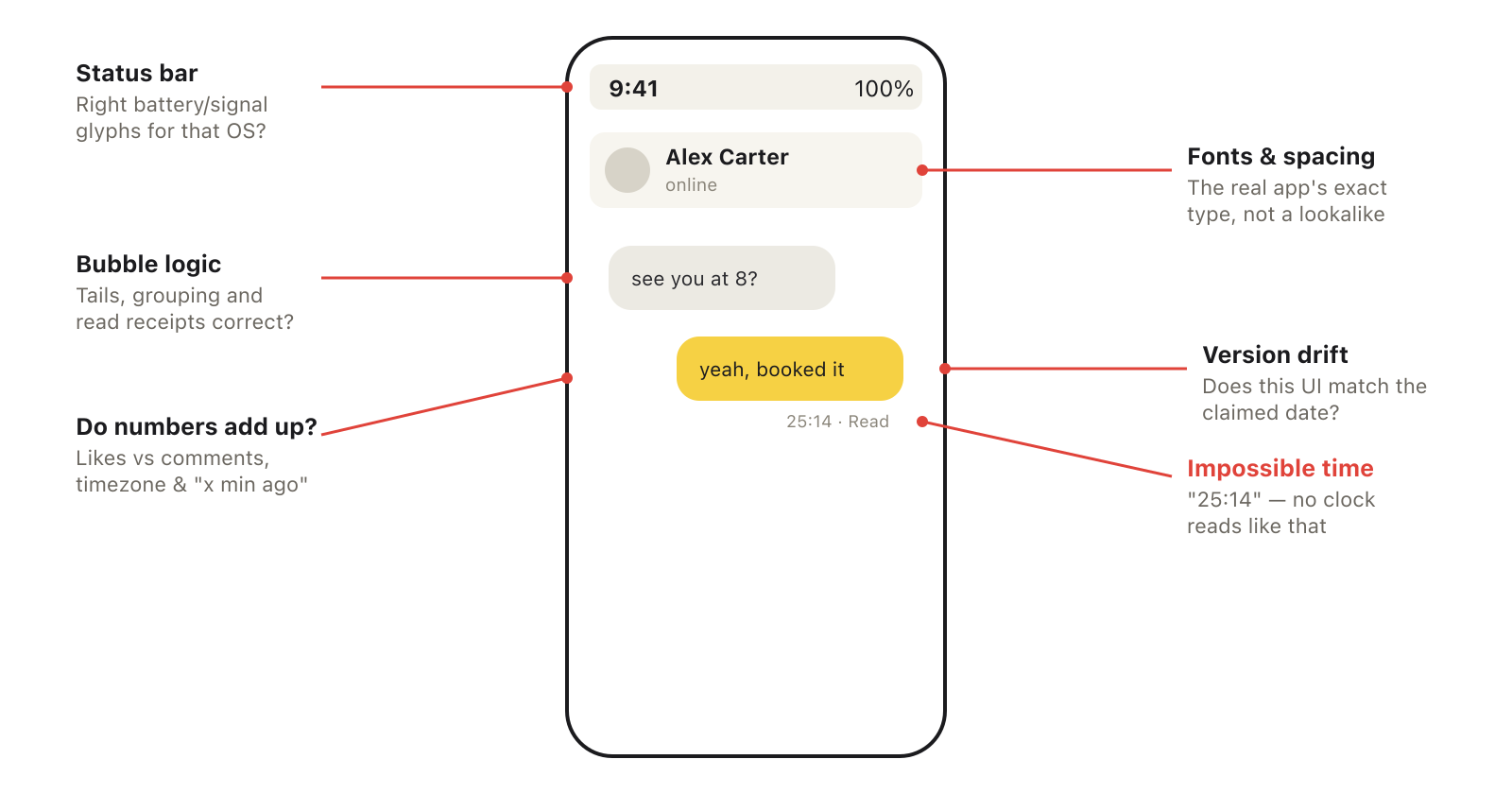
Check the chrome, not just the message. The status bar should carry the right clock, battery and signal glyphs for the claimed device and OS. The fonts should be the platform’s exact typeface and weight, not a near-match. Spacing, bubble tails, avatars, read receipts and timestamps each follow rules the real app never breaks. And watch for version drift: interfaces are redesigned constantly, so a current layout on an old-dated post — or a retired layout on a recent one — is a strong signal.
10. Internal consistency
Make the content argue with itself. Do the numbers add up — a post with more comments than it could plausibly have for its likes, a view count that outruns its age? Does the time math hold — “2 minutes ago” against a visible clock, timezones that line up with where the account claims to be? Does the verified badge and handle logic match how that platform actually assigns them? And the one that catches many fakes: an impossible timestamp like “25:14”, which no real clock will ever display. Finally, cross-check the device state against the clock: a chat stamped the small hours on a phone that shows a pristine 100% battery and a bright, light-mode interface is quietly contradicting itself — a real phone rarely sits at full charge deep in a late-night thread, and generators tend to leave the battery, signal and theme at their defaults no matter what time the conversation claims.
11. Reading the Zeoob mark
Zeoob gives you two different marks, and understanding the difference is itself good media literacy:
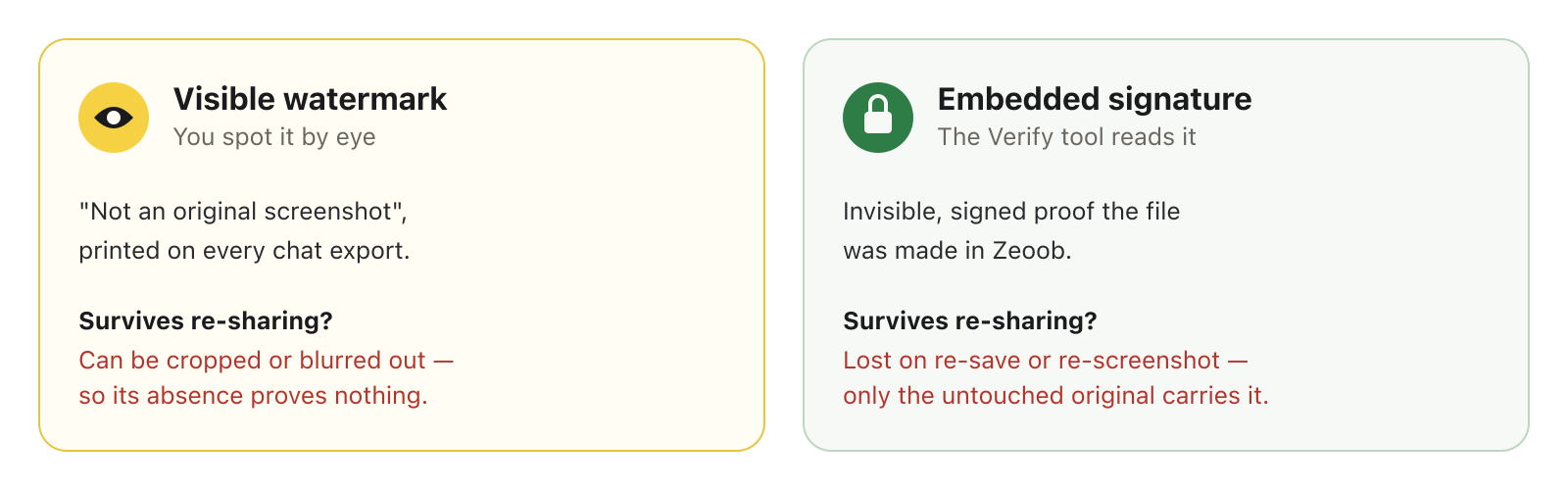
If you suspect a chat image was built in Zeoob, upload the original file to the Verify an image tool and it will read the embedded signature back. State the limit plainly, because it matters: that signature only survives on the unmodified original. A re-saved copy, a re-compressed upload, or a screenshot of the screenshot strips it. So a positive result confirms a Zeoob origin; a negative result tells you only that this particular file no longer carries the mark — not that the image is genuine.
Part 4 — AI-generated images
Generated images fail in their own way. Look at hands and fingers, at any text in the scene (signage, labels, watch faces — generators still garble letters), at over-symmetry and plastic-smooth skin, at backgrounds that warp, melt or repeat, and at jewellery, teeth and ears that do not quite resolve.
Be sceptical of “AI detector” websites. They produce confident-looking percentages and are wrong often enough in both directions that you should never hang a conclusion on one. The durable signal is not detection but provenance: C2PA credentials (Part 2) are far more reliable than any classifier guessing after the fact.
Part 5 — The verification workflow (researchers & fact-checkers)
For work that has to survive scrutiny, method matters as much as the tools. This is the part that turns a hunch into a defensible finding.
12. Build a verification chain
Gather several independent signals — provenance, reverse-search history, interface tells, pixel analysis — and weigh them together. Independence is the point: three tools that all read the same stripped EXIF are one signal, not three. Before you touch anything, preserve the original and record its SHA-256 hash, so you can prove later exactly which file you examined, and document every step in order so another person can reproduce it.
13. Cross-reference with OSINT
Verify the world around the image. Geolocation — landmarks, signage, architecture, licence-plate formats — places it in space; chronolocation — shadow direction and length (a sun-position calculator helps), weather records, foliage — places it in time. For provenance over time, archive.org and archive.today show when a page or image first existed and whether it has quietly changed since.
14. The toolkit
- Reverse search — Google Lens, TinEye, Yandex, Bing.
- Metadata — ExifTool, online EXIF viewers.
- Provenance — Content Credentials Verify (C2PA).
- Pixel & compression — FotoForensics, Forensically.
- Fact-checker suites — the InVID-WeVerify extension, and Bellingcat’s Online Investigation Toolkit, which bundle these and more into one workflow.
- Integrity — a hashing tool for the original.
15. Report with calibrated confidence
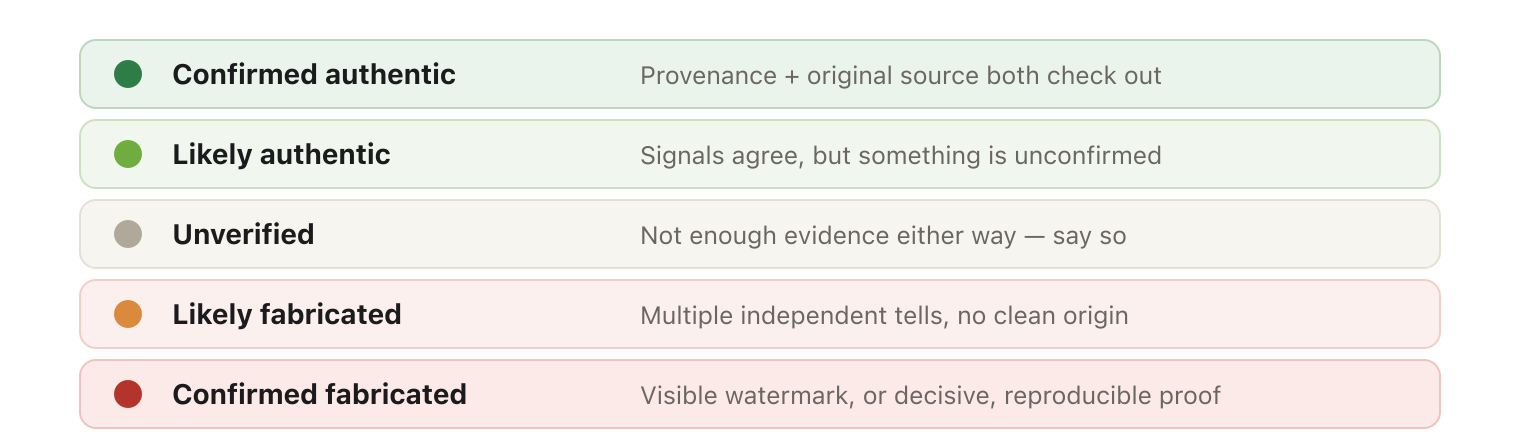
State what you found in terms of confidence, not certainty: confirmed, likely, or unverified — and say what would change your mind. “We could not verify this” is an honest, useful finding. “This is 100% fake” on the strength of one bright ELA patch is how credible checkers lose their credibility.
Part 6 — For the classroom
This whole method makes a sharp lesson, and the sandbox is built for it. Have students make a convincing fake in Zeoob — a chat, a post, a tweet — then swap with a partner and run the checklist to debunk the other’s work. Grade the method, not the verdict: the student who reasons carefully to “unverified” has learned more than the one who guessed “fake” and happened to be right.
It works because the editor stays deliberately neutral. Zeoob will not warn a student that a timestamp is impossible or a link looks like a scam — and neither will X, Discord or Instagram in the real world. The noticing has to become the student’s own habit, which is the entire point of a sandbox. See our guide for teachers for more classroom ideas.
Limits and ethics
No tool here is a lie detector. Each one narrows the uncertainty; none removes it. Hold two cautions in mind. First, absence of evidence is not evidence of absence — a clean file is not a verified one. Second, a false accusation does real harm: naming a genuine image as fake, or a real person as a forger, can be its own act of misinformation. When you publish a finding, show your work, state your confidence, and leave room to be corrected.
That is the whole posture, and it is the opposite of the race everyone else is running. While other tools compete to make the most undetectable fake, the skill worth building is the one on this page: learning to catch them.
Quick-reference checklist
- Watermark? Visible mark = mockup, done. No mark proves nothing.
- Source? Reverse-search for the earliest appearance and original context.
- Provenance? Check for C2PA Content Credentials.
- Metadata? Read EXIF — a lead, never a verdict; platforms strip it and it is easily faked.
- Pixels? ELA and clone/noise analysis to find regions to examine — not to declare a result.
- Interface? Fonts, status bar, spacing, read receipts, version drift, impossible timestamps.
- Consistency? Do the numbers, times, badges — and the device state (battery, signal, light/dark) — agree with each other and the clock?
- Preserve & report. Hash the original, document the steps, state calibrated confidence.